
Tool approvals and permission policies
Before running a tool, Mogick evaluates the session permission policy, the tool's risk level, workspace boundaries, explicit rules, and mandatory safeguards for deletion. It then allows the call automatically, asks for confirmation, or denies it. For complete policy rules, see Tool permission policies.
Select permission policy
mogick --tool-call-permissions auto
mogick run --tool-call-permissions workspace "Run the test suite and fix failures."
Use /permissions or Ctrl+P to switch in TUI. Common choices:
| Policy | Best for |
|---|---|
read | Code exploration and review; normal write operations are denied |
workspace | Automatically allowing non-deletion file changes inside the workspace |
auto | Everyday interactive work; confirmation depends on risk and tool metadata |
yolo | Isolated, discardable environments only |
Explicit deny still takes effect under all policies. Under non-yolo policies, file deletions, patches containing deletions, and shell calls matching delete commands always require confirmation.
Approval card
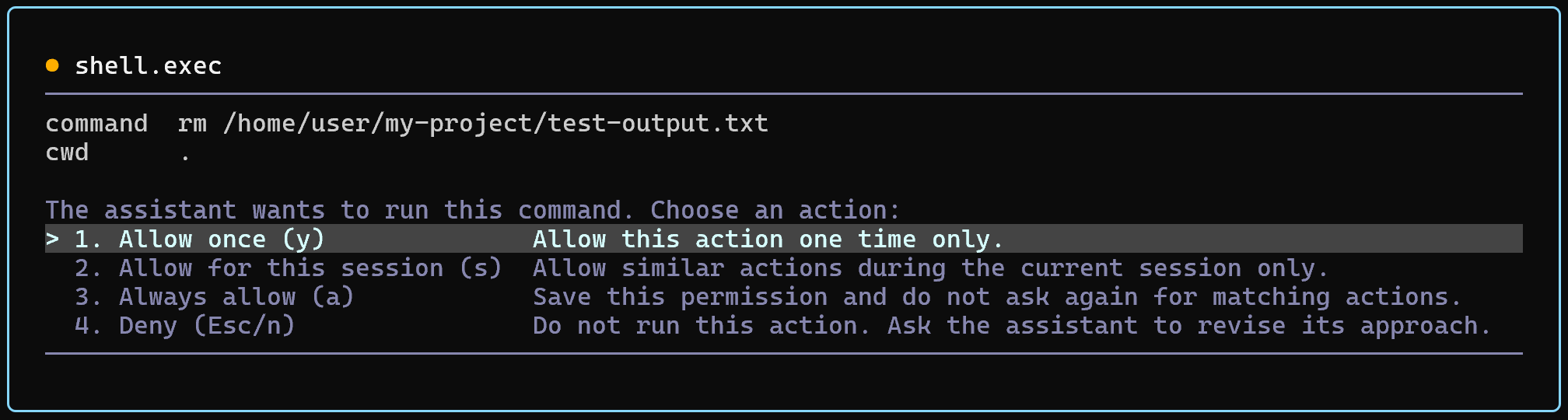
| Operation | Effective scope |
|---|---|
| Allow this time only | Only allow the current call |
| Allow for this session | Reuse the approval during the current session; clear it when the session ends |
| Always allow | Persist the approval until it is revoked from the permissions panel |
| Deny | Only reject the current request without creating an authorization |
Before approving, inspect the intended operation, tool name, file paths, command arguments, and external targets. Reject anything you do not understand and ask the agent to explain it.
Execution order and concurrency
Independent read-only tools in the same step can run concurrently, up to session.safe_partition_max_concurrency. Workspace writes, shell commands, and other side-effecting calls run in a controlled order to prevent overlapping changes.
MCP can also limit concurrency for each local and remote server individually:
session.mcp_local_max_concurrency: Default 3.session.mcp_remote_max_concurrency: Default 20.
These restrictions control scheduling and do not bypass approval rules.
Plan mode
Plan mode has its own read-only boundary, which a more permissive Agent-mode policy cannot override. After plan.write saves the plan, the TUI or ACP host asks for approval. Mogick enters Agent mode only after you approve it.
MCP tools
Mogick considers an MCP server's read-only metadata when assessing risk, but third-party metadata is not an absolute security guarantee. In progressive mode, mcp.call can wrap any server tool; approval is still evaluated against the actual target tool.
If an MCP tool's approval behavior is unexpected, inspect its metadata and the active policy, then see Troubleshoot MCP connections and tools.
Non-interactive execution
mogick run cannot display TUI approval prompts. Calls that require confirmation are denied, so scripts should select a policy explicitly and check the exit code. Prefer workspace in an isolated environment with a narrowly scoped task. Use yolo only when the environment is fully disposable.
Subagents
A subagent's effective permissions can never exceed the parent session's permissions. Each subagent also has independent step and tool-call budgets. See Subagents.