Engineering Scenario Cases
The four cases cover multidisciplinary modeling, closed-loop control validation, simulation repair, and legacy-model migration. Model structures, settings, and results match the accompanying images.
Scenario overview
| Scenario | Case | Expected result | Model status |
|---|---|---|---|
| Requirements to multidisciplinary model | Single-cylinder piston engine | Geometry and Modelica dynamics are generated, with continuous reciprocating motion | Completed |
| Control algorithm to closed-loop validation | Single-tank PID level control | A closed-loop tank model completes level-tracking simulation | Completed |
| Automatic simulation-error diagnosis | Crank-slider equation-redundancy repair | The planar cut joint removes redundancy and restores correct simulation and animation | Completed |
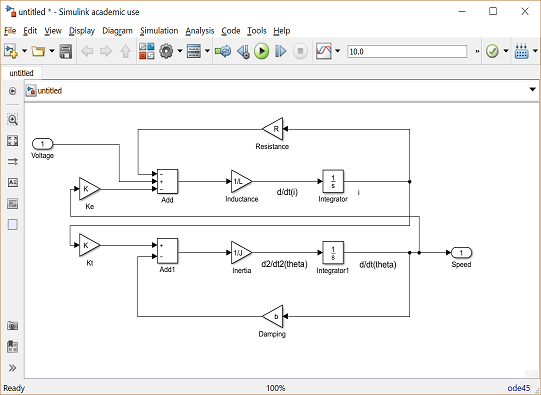
| Smart legacy-model migration | Simulink DC motor migrated to Sysblock | Sysblock contains a structurally complete DC motor model | Completed |
Single-cylinder piston engine
Objective
Build the geometry and dynamics of a single-cylinder piston engine so the crankshaft, connecting rod, and piston form a continuous crank-slider motion that can be viewed in a 3D animation.
Input (full prompt)
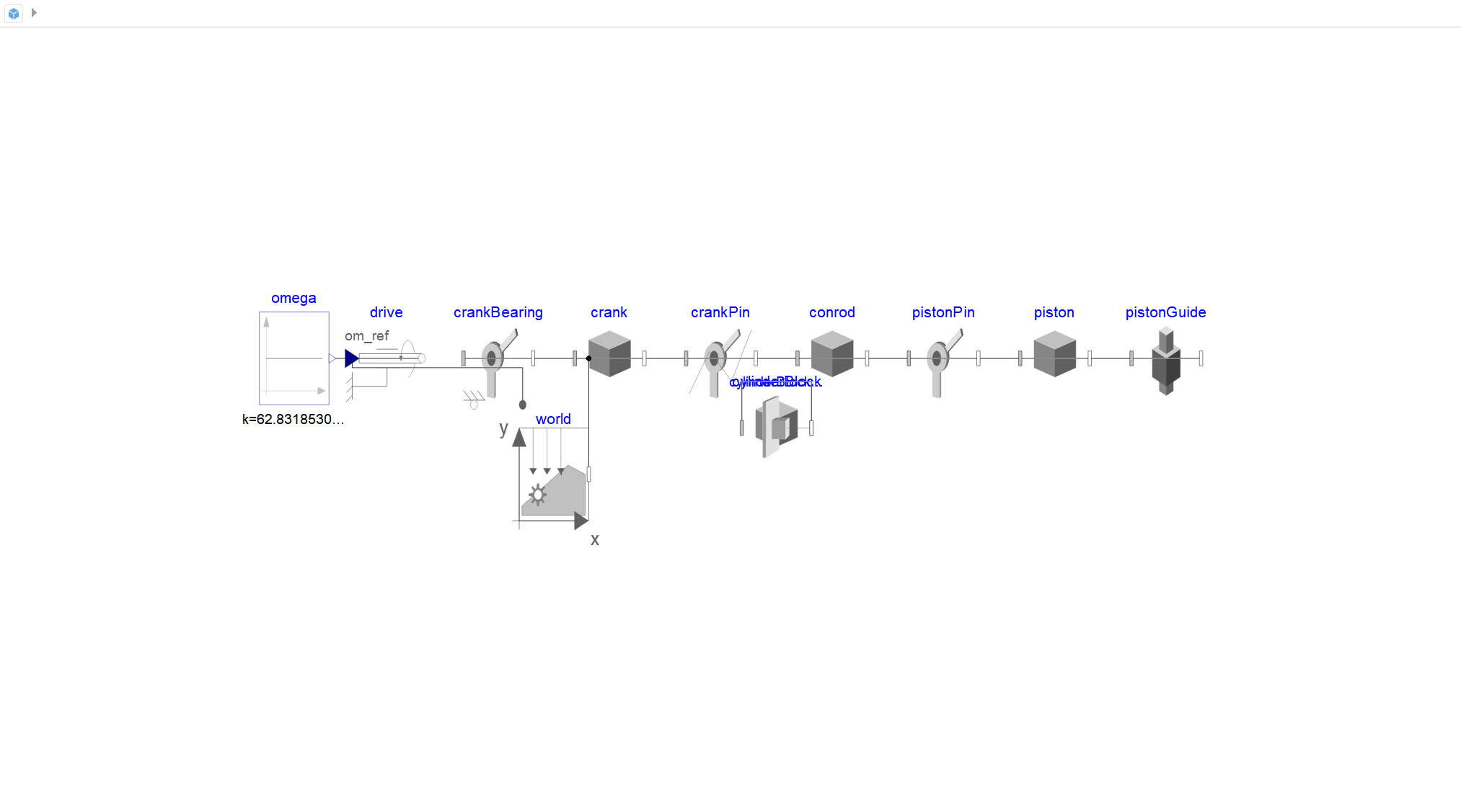
Build realistic single-cylinder piston-engine geometry in SysCAD, including the crankshaft, connecting rod, piston, and cylinder. In Sysplorer, use the Tongyuan TYMultibody library to build a crank-slider dynamic model with inner World, Revolute, Prismatic, a RevolutePlanarCut joint for the closed loop, and a constant-speed drive. Use the mass and inertia values from SysCAD, and disable animation for the revolute and prismatic joints. The model must pass check, translate, and simulate, and crank revolutions must match piston stroke exactly.
Expected result
SysCAD generates the crankshaft, connecting rod, piston, and cylinder geometry, while Sysplorer generates the corresponding Modelica crank-slider dynamic model. The model passes checking, translation, and simulation, and continuously converts crank rotation into reciprocating piston motion.
Model composition
- Constant angular-speed command and rotational drive;
- crank bearing, crank, and crank pin;
- connecting rod, piston pin, and piston;
- piston guide, world frame, and fixed constraints;
- planar cut joint for the closed kinematic loop.
Key settings
- The dynamic mechanism uses TYMultibody components.
- A constant angular-speed signal drives the crank; the displayed drive value is
62.831853…. - Joint animations are disabled so the 3D view shows only the engine geometry.
- The piston guide constrains axial motion, while the planar cut joint closes the crank-rod-piston loop without redundant constraints.
Model status
Completed. The crank-slider components, drive, and constraints are connected as a runnable dynamic model.
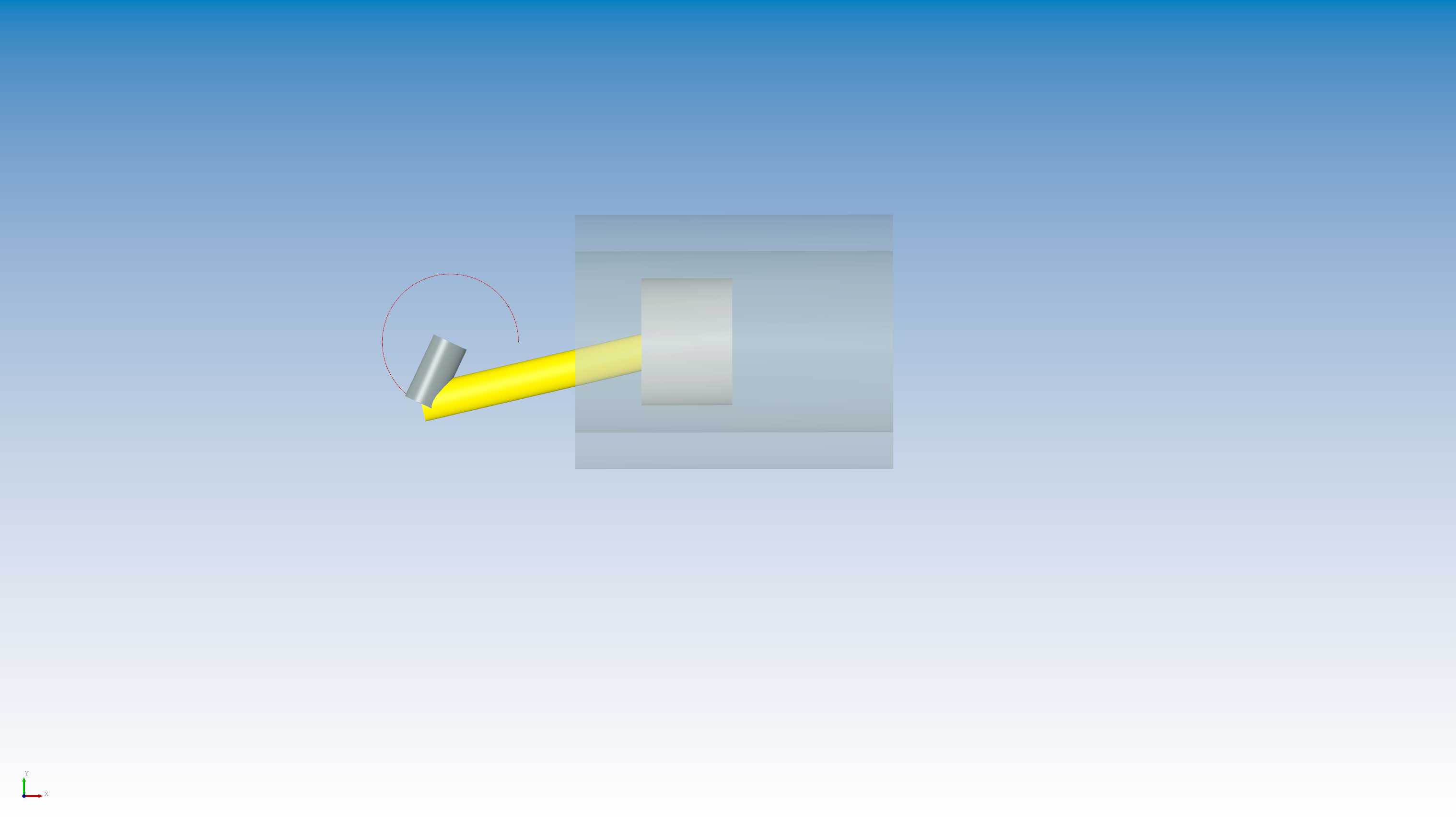
Actual output
- Primary output: reciprocating piston motion along the guide axis.
- The 3D view shows continuous crank rotation, connecting-rod oscillation, and linear piston motion.
- This case presents mechanism motion in the 3D view; no separate displacement or velocity plot is configured.
Result
Crank rotation is converted by the connecting rod into linear piston motion. The 3D animation shows the crank, rod, piston, and cylinder in their working positions, with the piston remaining on its guide axis.
Single-tank PID level control
Objective
Build a closed-loop tank-level system in which a PID controller adjusts the inlet valve to track a step setpoint, while tank mass, pressure, and volume are monitored.
Input (full prompt)
Build a single-tank PID level-control model in Sysplorer using the basic thermal-fluid model library. Include a tank, inlet valve, outlet, and level sensor. Run a level-tracking simulation and analyze settling time, overshoot, and steady-state error.
Expected result
Sysplorer generates a closed-loop model containing the tank, inlet valve, outlet, level sensor, and PID controller. The model runs normally and produces a level-response curve suitable for evaluating settling time, overshoot, and steady-state error.
Model composition
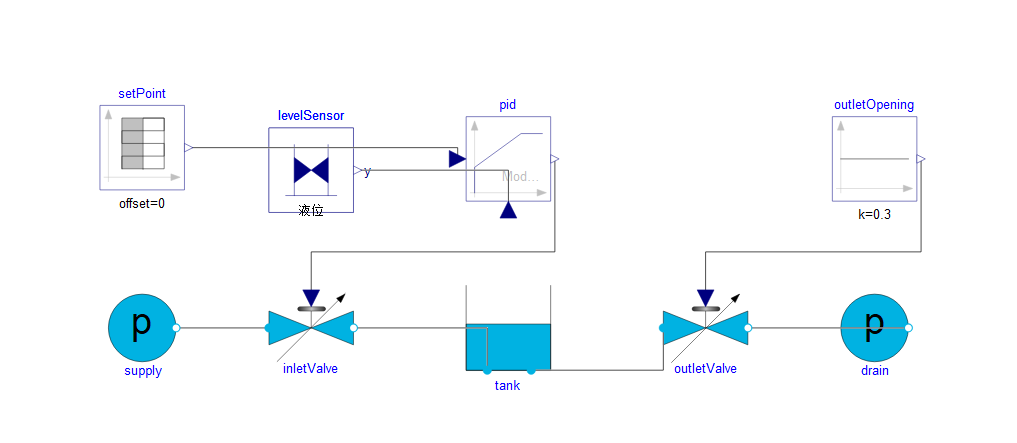
- Level setpoint and PID controller;
- supply-pressure boundary and inlet control valve;
- tank and level sensor;
- outlet valve, outlet-opening command, and drain-pressure boundary.
Key settings
- The level-sensor feedback enters the PID controller, whose output drives the inlet valve.
- The outlet-opening command is set to
0.3. - The level setpoint steps from
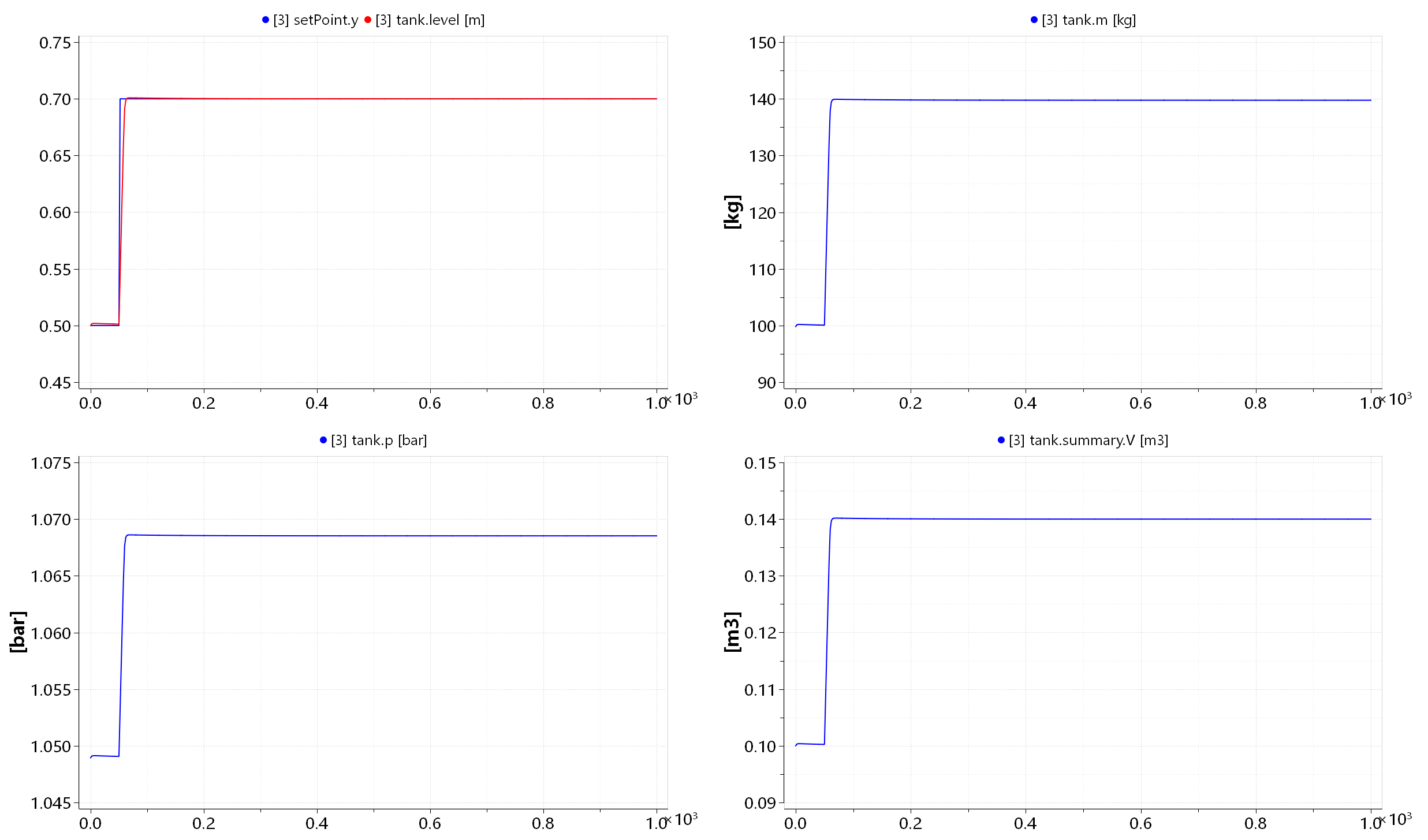
0.5 mto0.7 m. - The result view includes level, fluid mass, tank pressure, and volume.
Model status
Completed. The tank, valves, pressure boundaries, sensor, and PID loop are fully connected, and the level-tracking simulation has run.
Actual output
- Control output: inlet-valve opening command from the PID controller.
- Result output: tank level
tank.level, used to evaluate setpoint tracking. - The result view also outputs fluid mass
tank.m, pressuretank.p, and volumetank.summary.V.
Result
The measured level rises from 0.5 m to 0.7 m and overlaps the setpoint after a short transition, with no visible steady-state offset. During the level change, fluid mass increases from approximately 100 kg to 140 kg, volume from about 0.10 m³ to 0.14 m³, and tank pressure rises to a stable value.
Crank-slider equation-redundancy repair
Objective
Remove redundant equations from the planar crank-slider loop so the mechanism can be checked, simulated, and animated again.
Input (full prompt)
Use the mechanical-modeling skills to repair the crank-slider mechanism. Replace the redundant closed-loop constraint with a planar cut joint and remove the redundant equations from the model.
Expected result
The standard rotational constraint in the closed loop is replaced with a planar cut joint, eliminating the redundant equations. The repaired crank-slider model passes checking and simulation, and its 3D animation shows correct crank, connecting-rod, and slider motion.
Model composition
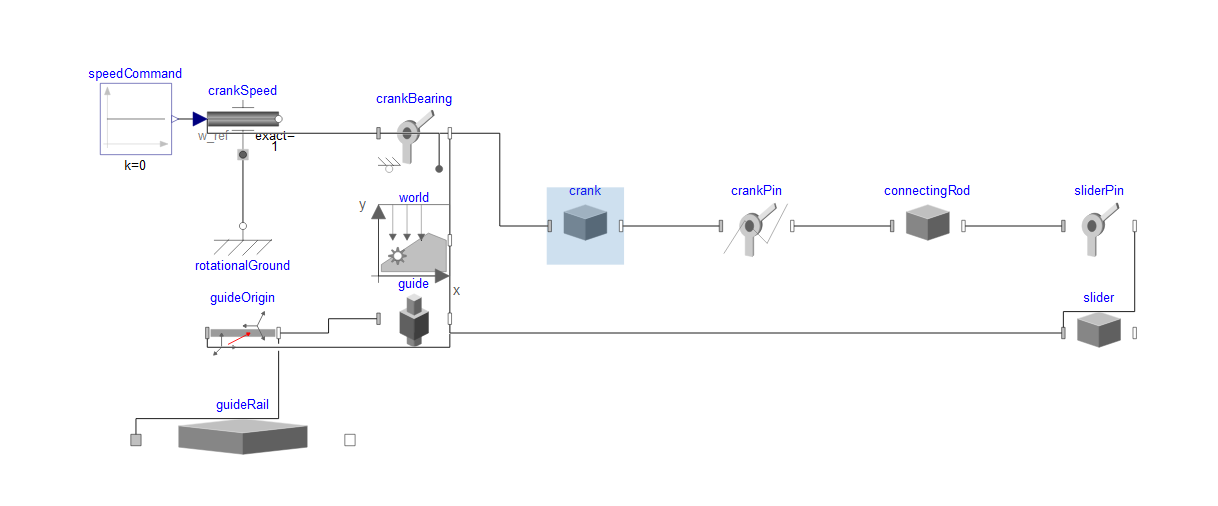
- Speed command, crank-speed drive, and rotational ground;
- crank bearing, crank, and crank pin;
- connecting rod, slider pin, and slider;
- guide origin, linear guide, and world frame.
Key settings
- A standard rotational constraint in the loop is replaced with a planar cut joint to remove redundant constraints.
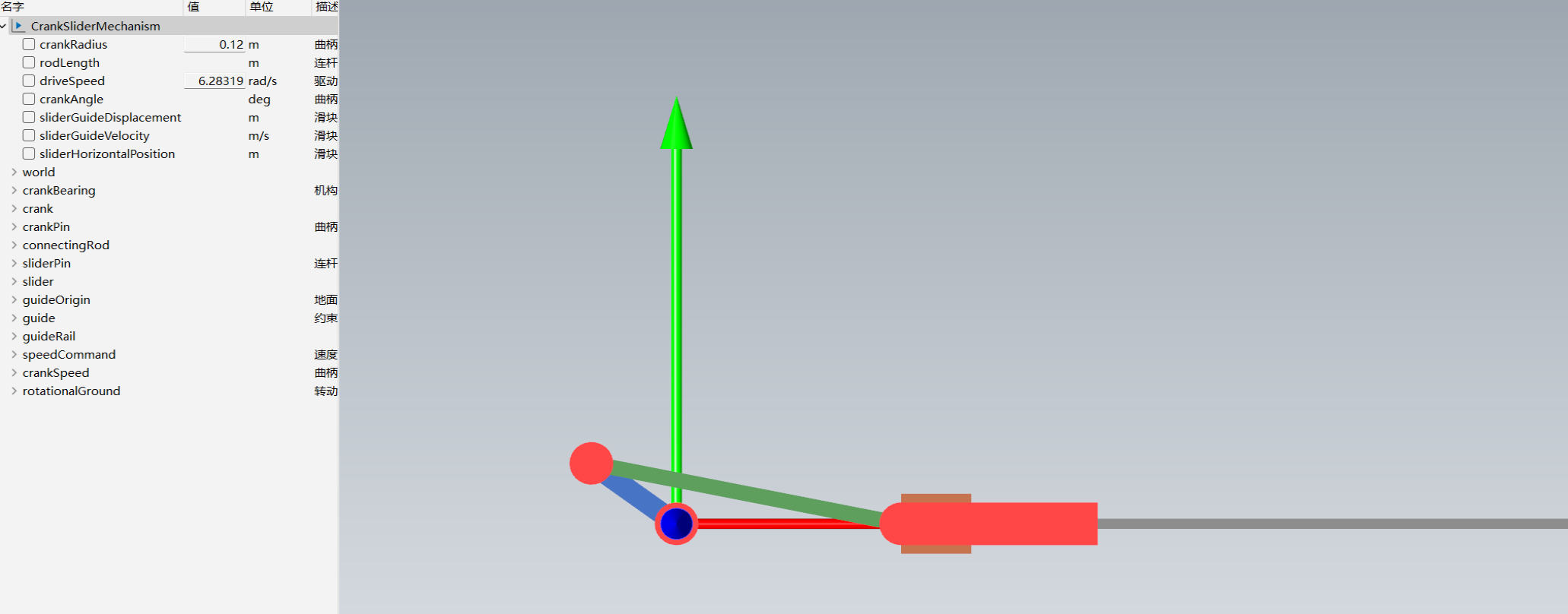
- Crank radius is
0.12 m. - Drive speed is
6.28319 rad/s, equivalent to one revolution per second. - The linear guide constrains the slider to horizontal motion.
Model status
Completed. The closed-loop constraint has been corrected, and the crank, rod, slider, and guide form a runnable model.
Actual output
- Primary outputs: slider displacement and velocity along the guide.
- Observable variables include crank angle
crankAngle, guide displacementsliderGuideDisplacement, guide velocitysliderGuideVelocity, and horizontal positionsliderHorizontalPosition. - The 3D view outputs a continuous animation of the crank, connecting rod, and slider.
Result
The crank rotates at constant speed and the connecting rod drives the slider back and forth along the guide. The 3D animation runs continuously while the crank, rod, and slider remain correctly connected.
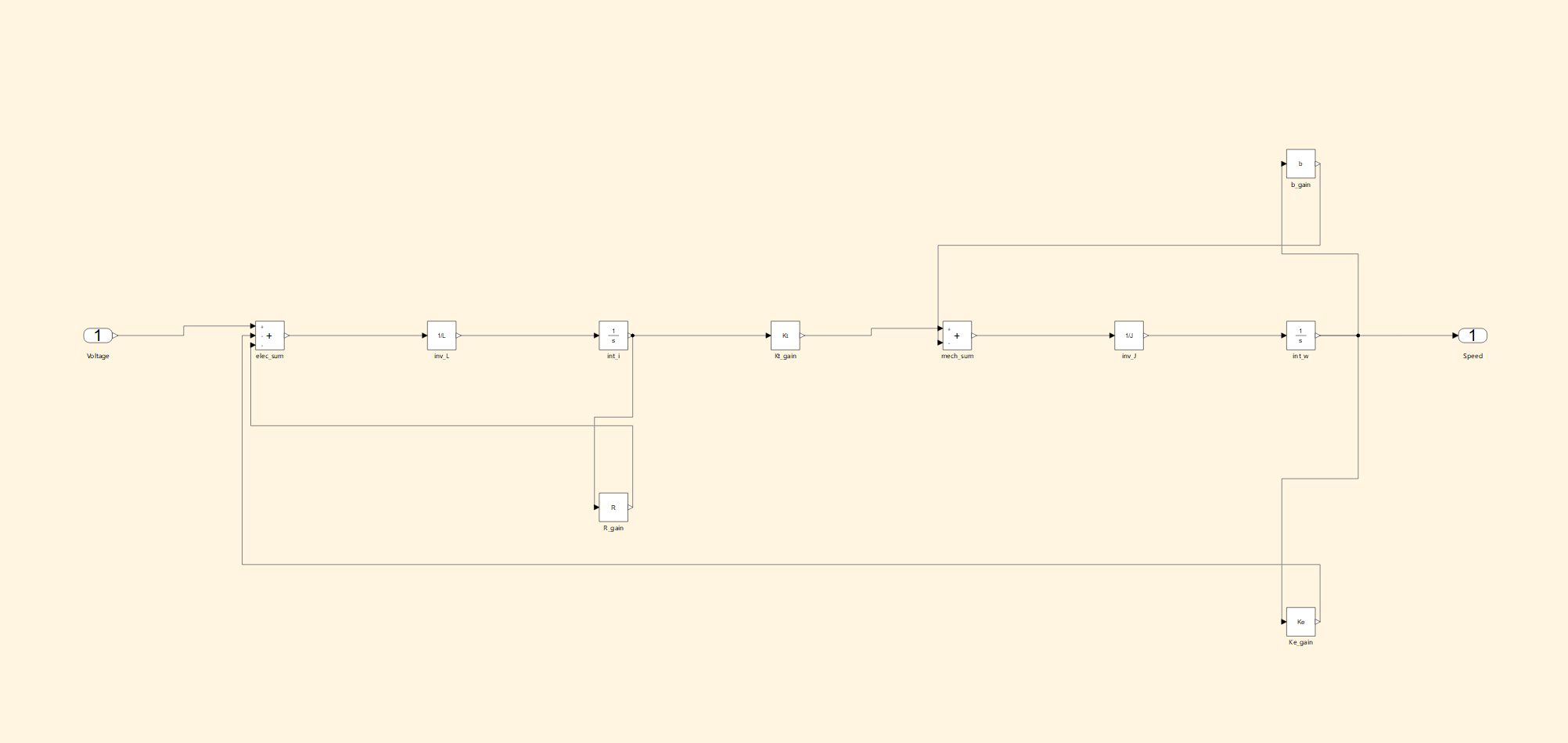
Simulink DC motor migration to Sysblock
Objective
Migrate a DC motor block diagram from Simulink to Sysblock while preserving the armature circuit, electromechanical conversion, mechanical dynamics, and back-EMF feedback.
Input (full prompt)
Build a DC motor speed-control model in Sysplorer with Sysblock. Use
Voltageas the input. Subtract theKeback-EMF feedback and theRarmature-resistance drop, then pass the result through the1/Linductance stage and integrate it to obtain currenti. Convert current to torque throughKt, subtract thebdamping feedback, and pass the result through the1/Jinertia stage and an integrator to obtain theSpeedoutput. Retain the parameter namesKe,Kt,R,L,J, andbwithout assigning values. Complete the connections, layout, and model check.
Expected result
Sysblock generates a complete DC motor model from Voltage to Speed, including Ke, R, 1/L, current integration, Kt, b, 1/J, and speed integration. Parameter names remain unchanged, connections and feedback directions are complete, and the model passes checking.
Model composition
Voltageinput and electrical summing block;- resistance feedback
R, inductance block1/L, and current integrator; - torque constant
Ktand mechanical summing block; - damping feedback
b, inertia block1/J, and speed integrator; - back-EMF feedback
KeandSpeedoutput.
Key settings
- Parameter names
Ke,Kt,R,L,J, andbare retained for reuse with the original model data. - Armature current follows
di/dt = (Voltage − Ke·Speed − R·i) / L, including both back EMF and resistive voltage drop. - Electromagnetic torque is calculated by
Kt; after damping torque is subtracted,1/Jintegration produces speed. - Signal directions, summing signs, and both feedback paths match the original Simulink diagram.
Model status
Completed. The DC motor diagram has been migrated to Sysblock with all components, connections, and feedback paths in place.
Actual output
- Output port:
Speed, representing motor-shaft angular speed. - Current integrator
int_ioutputs armature currenti, which is converted byKtinto electromagnetic torque. - Speed also enters the
Keandbfeedback paths to produce back EMF and damping torque.
Result
The migrated model preserves the original electrical and mechanical equations: current produces electromagnetic torque, resistive voltage drop and back EMF enter the electrical feedback path, and damping torque enters the mechanical feedback path.